Google Classroom
- 2.8
- Rating
- 100.00M
- Installs
- Free
- Price

 Analysis by App-foxy
I spent time with Google Classroom as an education app rather than treating it as just another place to receive school notifications. Its main job is to bring classes, assignments, materials, and teacher communication into one mobile workspace. That sounds simple, but the real test is whether it remains useful after the first burst of curiosity disappears. In my experience, it can earn a regular place on a student’s phone when a teacher actively organizes the class inside it. When that structure is missing, the app feels much less valuable.
Google LLC developed the app, which is free and available for Everyone. It belongs to the education category and has been available since January 14, 2015. Its reach is enormous, with over 100 million installs, although the average sits at 2.8 from around 2 million ratings. That combination tells me something important: Classroom is widely needed, but a large audience does not automatically mean a smooth experience for every student, parent, or teacher.
What Google Classroom feels like during the first week
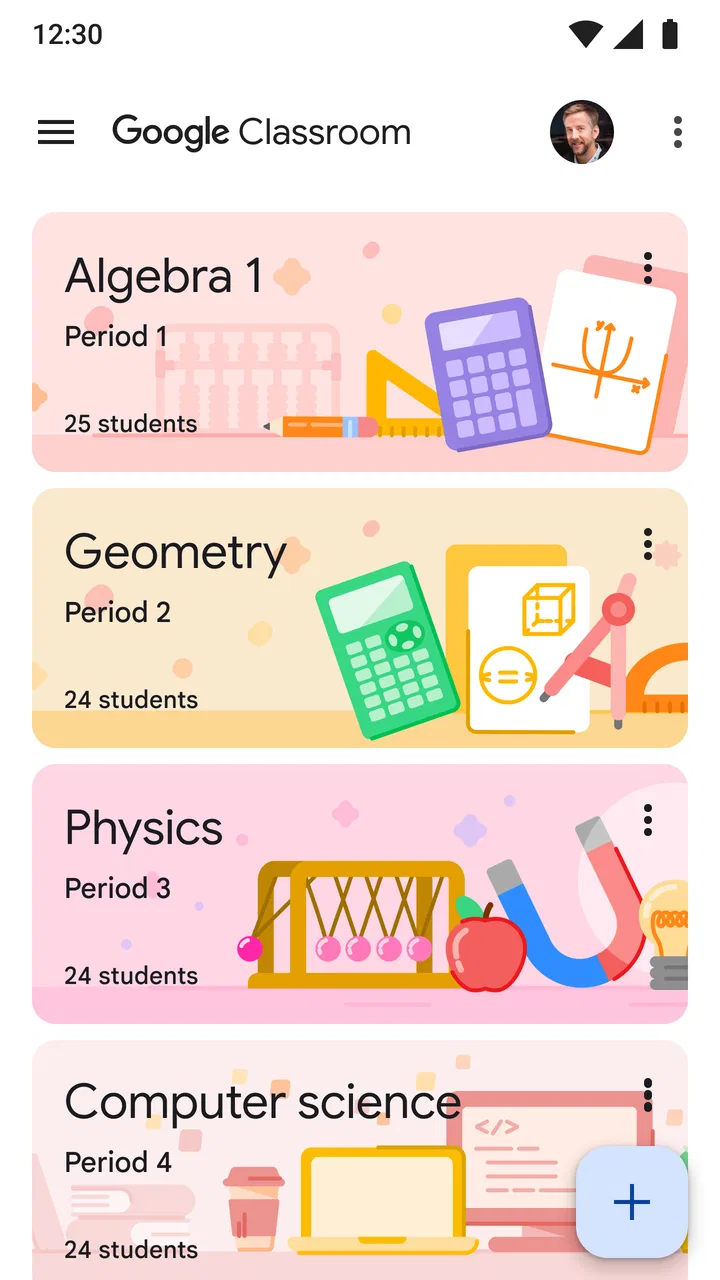
The first week is usually the most convincing part of the experience. Once I joined a class, the basic purpose was easy to understand: the class stream provides a central place for updates, while classwork gathers tasks and learning materials into a more practical working area. Instead of searching through long message threads or trying to remember which attachment belongs to which lesson, I could return to the relevant class and look for the assignment there.
You May Also Like

 AccuWeather: Weather Radar
AccuWeather Review: A Quick, Clear Forecast for Everyday Decisions
For everyday plans, the best forecast is the one you can understand quickly. AccuWeather makes rain timing, radar, and local conditions easy to act on, with a few trade-offs.

 Hill Climb Racing
Why Hill Climb Racing Still Turns Crashes Into One More Run
A tiny car, a bumpy hill and one more upgrade: Hill Climb Racing keeps resurfacing because its simple chaos makes every near-miss feel personal.

 AliExpress - Shopping App
AliExpress Makes Global Shopping Feel Personal, but Shoppers Bear the Risk
AliExpress turns a global marketplace into a pocket-sized discovery engine. Its reach is useful, its shopping loop compelling, and its trade-offs easy to miss.

 Lords Mobile: Kingdom Wars
Lords Mobile Is a Kingdom-Building Routine, Not a Quick Match
A case-by-case verdict on the building, battles, device demands, and social commitments that make Lords Mobile rewarding for some players and exhausting for others.

 PDF Scanner app - TapScanner
TapScanner Makes Paperwork Easier to Capture, Check, and Share
TapScanner makes scanning with a phone feel less like a rescue operation and more like a dependable step in getting work done. Its capture tools are useful, though not flawless.

 Block Blast!
Block Blast! Shows How Much a Puzzle Game Can Leave Out
A quiet grid game shows why puzzle players increasingly value instant clarity, repeatable skill and low-pressure play—and where the genre still needs to catch up.
More From Our News Desk
View All News


That centralization is especially helpful when several subjects use the same school account. A student may move from mathematics to history and then to science without switching between separate messaging apps, email chains, and shared folders. The app does not make the work itself easier, but it reduces the number of places where instructions can hide. The biggest first-week benefit is less searching, not more learning content.
Notifications also make the early experience feel responsive. A new announcement or task can bring attention to something that might otherwise be missed. I would not rely on notifications as my only planning system, though. A notification tells me that something changed; it does not necessarily help me understand how that task fits with everything else due this week. I still prefer checking the classwork area and my own calendar or notebook before deciding what to do first.
For a teacher, the opening experience depends heavily on preparation. A well-arranged class with clear topics and consistent naming feels calm. A class filled with loosely named posts becomes confusing very quickly, even though the app itself has not changed. This is one of Classroom’s defining trade-offs: it gives teachers a framework, but the quality of that framework depends on how carefully the teacher maintains it.
Students should also know that joining a class is not the same as having every school activity in one place. Classroom works best when the teacher actually posts instructions, files, and submission requirements there. If one teacher uses it fully while another continues to depend on email, paper handouts, or a different learning platform, the student still has to monitor several systems. The app can simplify a school routine, but it cannot unify processes that are not being managed through it.
Small workflows that make the opening experience better
One useful habit is to open the classwork section before opening individual notifications. Notifications are good for catching changes, but the classwork view gives better context. I can see whether a message relates to an upcoming task, an old assignment, or a piece of reference material. This avoids the common mistake of treating every alert as an urgent deadline.
I also found it worthwhile to read the teacher’s instructions completely before opening or editing an attached document. In classroom apps, the file often gets the attention, while the important details about format, questions, or submission are written around it. Reading the instructions first reduces avoidable backtracking and makes it clearer whether I am expected to turn in a document, answer in a comment, or simply review the material.
Another practical tip is to check the class stream after a teacher announces a change. A later update may alter the wording or timing of an assignment, and working from an old notification can lead to unnecessary confusion. This is not an advanced feature hidden behind a menu; it is a workflow choice that makes the app more dependable. Classroom rewards users who treat it as a living workspace rather than a static inbox.
Why the value can continue from month to month
After the novelty fades, Google Classroom becomes less about discovering features and more about routine. Its lasting value comes from repetition: teachers post work in familiar locations, students return to the same classes, and completed tasks remain connected to their original context. That continuity is more useful than a flashy interface because schoolwork is already repetitive. The app’s job is to make the repeated process less scattered.
For a student handling several subjects, the strongest monthly benefit is visibility. I can revisit an assignment after a weekend, locate the original instructions, and see whether I have already submitted something. That is more reliable than relying on memory or searching a general email inbox. It also helps when a task is interrupted by another deadline, because the class remains a reference point instead of disappearing into a stream of unrelated messages.
There is a subtle advantage for students who miss a lesson or need to work away from school. Classroom can preserve the teacher’s posted materials and instructions in the same place as the class itself. That does not replace an explanation from the teacher, and it does not guarantee that every part of a lesson will be available digitally. Still, having the assignment context accessible on a phone can make catching up more manageable than waiting for a paper copy or asking classmates to forward everything.
Families may also find it useful when they need a clearer view of what schoolwork is being assigned. However, I would not describe it as a complete parent dashboard based on the experience of using it as a student workspace. Its design is centered on class participation and task handling. Parents who want a broad overview across multiple children, subjects, and schools may find a dedicated school information system easier to interpret.
Teachers gain a recurring benefit when they use consistent patterns. Posting a task with a clear title, a useful description, and the right classwork location saves students from asking the same clarification repeatedly. Over time, that can reduce administrative friction. The reverse is also true: inconsistent titles, late updates, and instructions spread across comments and announcements make the app feel tiring. Classroom does not automatically create good organization; it makes the teacher’s organizational choices more visible.
Where it compares well with ordinary alternatives
Compared with ordinary email, Classroom is better at keeping an assignment attached to its class and related materials. Email is flexible, but long threads become difficult to scan, and an attachment can be separated from the instructions that explain it. Classroom offers a more school-specific structure, which is valuable when the same student receives work from several teachers.
Compared with paper handouts, the app is easier to revisit when a student is away from the classroom or has misplaced a sheet. The trade-off is that a paper list can be quicker to scan and does not depend on opening an app. For a short instruction written on a board, paper or a notebook may still be more convenient than creating a digital workflow.
Compared with a general task manager, Classroom has better educational context but less personal flexibility. A task manager is usually stronger for combining school, work, errands, and personal deadlines in one customized schedule. Classroom is stronger when the question is, “What did this teacher assign, and where are the related materials?” I would use both if school deadlines compete with the rest of my life.
Compared with a broad learning platform, Classroom can feel lighter and easier to enter because its purpose is focused on class coordination. That simplicity is useful for everyday assignments, but users who need deep course discussions, elaborate lesson paths, or a highly customized learning environment may prefer a platform designed around those needs. The right choice depends less on the app’s popularity than on how complex the teaching workflow is.
Maintenance, fatigue, and the work required to keep it useful
The maintenance burden for students is moderate, but it is easy to underestimate. I need to check more than the notification shade, keep track of which tasks are actually finished, and notice when a teacher edits or adds information. If I only respond to alerts, I can miss the larger pattern of upcoming work. A short daily review of classwork is more sustainable than repeatedly reacting to interruptions.
Teachers carry the heavier maintenance burden. Every class benefits from naming conventions, accurate topics, timely updates, and clear submission instructions. Over a long term, small inconsistencies accumulate. An assignment posted in the wrong place may not be technically broken, but it creates questions, duplicate messages, and uncertainty about what students should do. Classroom’s recurring value therefore depends on discipline from the person managing the class.
One source of fatigue is the difference between a notification and an actionable plan. Several alerts can arrive without telling me which task deserves attention first. Students who already struggle with deadlines may need to copy important due dates into a separate planner. That feels like extra work, but it is a sensible trade-off: Classroom is a class hub, not necessarily a complete personal time-management system.
Another source of fatigue is checking multiple classes that use different posting habits. One teacher may place everything under classwork, another may rely on the stream, and another may use Classroom only for links. The app then becomes a collection of different mini-systems. The frustration is not solved by installing a different version; it comes from inconsistent use. Before blaming the app, I would look at whether each class has a predictable routine.
Mobile use introduces its own compromise. A phone is convenient for reading instructions, checking a deadline, or responding quickly, but longer assignments and detailed document editing are usually more comfortable on a larger screen. I would happily use the mobile app for monitoring and short actions, while doing substantial writing or file work elsewhere when possible. Students expecting the phone to replace every part of a desktop workflow may find the experience cramped or slower than expected.
There is also a psychological cost to keeping school permanently within reach. Easy access can help a student catch up, but it can also encourage constant checking. I recommend setting a simple boundary: review Classroom at planned times, then close it unless a genuine deadline requires attention. That habit protects the app’s usefulness. Without a boundary, a tool intended to reduce uncertainty can become another source of low-level stress.
Who should use it, and who may be better served elsewhere
I think Classroom is a strong fit for students whose teachers actively use it as the main location for assignments and materials. It is also useful for learners who move between school and home, regularly lose paper instructions, or need to revisit the exact wording of a task. Teachers who want a straightforward place to distribute work and collect responses can benefit from its focused structure.
I would be more cautious if your school uses several platforms without a clear division of responsibilities. In that situation, Classroom may still be necessary, but it will not be the single source of truth you hope for. Students who need advanced personal planning, detailed progress analytics, or a unified family schedule should pair it with another tool rather than expecting Classroom to cover every need.
It may also be the wrong choice as a standalone learning environment for someone looking for self-paced courses. Classroom is built around classes and teacher-led work, not around independently browsing a large catalog of lessons. If your goal is informal learning without enrollment in a class, a dedicated course or tutorial app will likely be a better match.
Does it earn permanent space after the novelty fades?
My long-term opinion is positive but conditional. Google Classroom earns lasting space when it becomes part of a teacher’s established routine and when the student uses it deliberately rather than passively. Its value is not in making schoolwork exciting. Its value is in preserving context, reducing scattered instructions, and giving recurring tasks a recognizable home.
The average rating of 2.8 shows that the experience is not universally smooth, and I understand why. Students may encounter confusing class organization, inconsistent teacher habits, or mobile workflows that are less comfortable for substantial work. Those frustrations are real. At the same time, the app’s large audience and over 100 million installs reflect how practical its central idea is for schools that need a shared digital classroom.
The current version is 3.58.916096563, and the app requires at least Android 8.1. For someone deciding whether to install it, the more important question is not simply whether the phone can run it. Ask whether your teachers actually use Google Classroom consistently. If they do, the app can become a dependable daily checkpoint. If they do not, installation alone will not create the organization you need.
I would recommend keeping it for enrolled students, active teachers, and anyone who needs a reliable mobile window into classwork. I would not recommend treating it as a replacement for a personal planner, a full parent portal, or a complete document-production environment. Its lasting strength is dependable class coordination, not total school management. Used with that expectation, it remains a useful free education app long after the first week; used as an all-purpose solution, it is likely to feel limited and tiring.
FAQs for Google Classroom
01What is Google Classroom and how does it work?
Google Classroom is a free web service developed by Google for schools, that aims to simplify creating, distributing, and grading assignments. It streamlines the educational process by integrating tools like Google Docs, Sheets, and Slides, making it easy for teachers to create and collect assignments paperlessly. Students can access class materials, submit work, and receive feedback all within the platform.
02Is Google Classroom free to use?
Yes, Google Classroom is free for schools and individuals with a Google account. However, organizations may need to sign up for Google Workspace for Education, which offers additional features and administrative controls. This ensures enhanced security and collaboration capabilities for educational institutions.
03What devices are compatible with Google Classroom?
Google Classroom is compatible with a wide range of devices, including laptops, desktops, tablets, and smartphones. It can be accessed via any web browser or through the Google Classroom app, which is available on both Android and iOS platforms, making it versatile and accessible for both teachers and students.
04How secure is Google Classroom for student data?
Google Classroom adheres to strict privacy and security protocols to protect student data. It complies with various educational standards like FERPA, ensuring that all user data is encrypted and secure. Google does not sell or use student data for advertising purposes, maintaining a strong focus on privacy.
05Can parents access Google Classroom?
While parents can't directly access Google Classroom, they can receive email summaries if invited by the teacher. These summaries include information about upcoming assignments, missing work, and class announcements. This feature helps keep parents informed about their child's progress and upcoming tasks in the class.
Pros
- User-friendly interface for easy navigation.
- Seamless integration with Google Drive.
- Real-time collaboration tools.
- Mobile app provides notifications.
- Supports a wide range of file types.
Cons
- Limited customization for assignments.
- Offline access can be inconsistent.
- No native grade book feature.
- Requires constant internet connection.
- Limited analytics for student performance.

Google Classroom
Gallery